Getting Started with Chart Themes
A Chart Theme is a collection of formatting options that can be applied to an individual KPI Tile or Panel within a Query Dashboard to control the overall look-and-feel of that component. The platform includes several built-in Chart Themes, but you can also create your own custom Chart Themes.
Each Chart Theme includes the following formatting options:
-
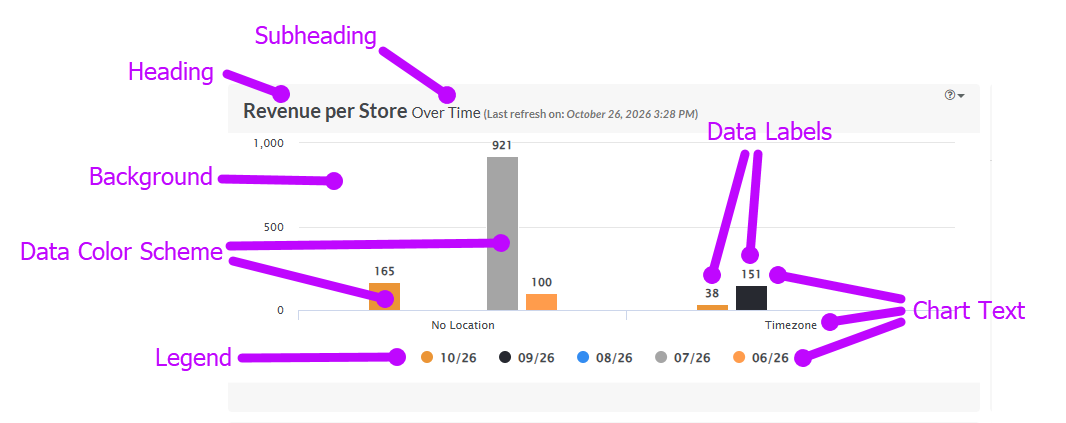
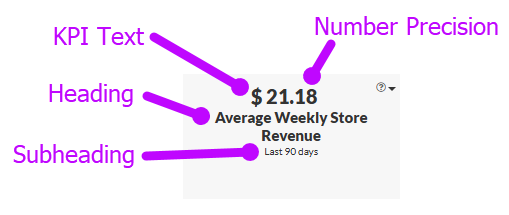
Heading: The Heading is displayed at the top of a KPI Tile or Panel. Within a Chart Theme, you can define the size and color of this text.
-
Subheading: The Subheading is displayed next to the Heading in a Panel, and beneath the Heading in a KPI Tile. Within a Chart Theme, you can define the size and color of this text.
-
Chart Text: Chart text includes the labels in a chart legend, the labels alongside points in the chart, and the labels along the X- and Y-axes. Within a Chart Theme, you can define the size and color of this text.
-
KPI Text: KPI text refers to the actual value being reported within the KPI Tile or within the KPI component of a Panel. Within a Chart Theme, you can define the size and color of this text.
-
Background: The background color of a Panel.
-
Data Color Scheme: One or more colors used in charts in Panels, such as for the bars in a bar chart, the slices in a pie chart, and so forth.
-
Number Precision: The number of decimal places to use when displaying numbers.
-
Legend: If enabled, the platform displays a legend beneath a chart in a Panel.
-
Data Label: If enabled, the platform displays labels alongside the objects in a chart in a Panel, such as the bars in a bar chart, the slices in a pie chart, and so forth.
The following diagram depicts the different formatting options within a Panel.
The following diagram depicts the different formatting options within a KPI Panel.
Access
The Chart Themes screen is used to view, create, and manage the Chart Themes in your loyalty program. To access the Chart Themes screen, select Analytics from the top navigation bar, then select Settings > Chart Themes from the side navigation menu.
Quick Links
 Create a Chart Theme |
 View a Chart Theme |
 Delete a Chart Theme |